
Channels / Regional platforms
Feishu / Lark
Feishu/Lark is an all-in-one collaboration platform where teams chat, share documents, manage calendars, and get work done together.
Status: production-ready for bot DMs + group chats. WebSocket is the default mode; webhook mode is optional.
Quick start
Requires Genesis 2026.4.24 or above. Run
genesis --versionto check. Upgrade withgenesis update.
Run the channel setup wizard
genesis channels login --channel feishu
Scan the QR code with your Feishu/Lark mobile app to create a Feishu/Lark bot automatically.
After setup completes, restart the gateway to apply the changes
genesis gateway restart
Access control
Direct messages
Configure dmPolicy to control who can DM the bot:
"pairing"— unknown users receive a pairing code; approve via CLI"allowlist"— only users listed inallowFromcan chat (default: bot owner only)"open"— allow all users"disabled"— disable all DMs
Approve a pairing request:
genesis pairing list feishu
genesis pairing approve feishu <CODE>
Group chats
Group policy (channels.feishu.groupPolicy):
| Value | Behavior |
|---|---|
"open" |
Respond to all messages in groups |
"allowlist" |
Only respond to groups in groupAllowFrom |
"disabled" |
Disable all group messages |
Default: allowlist
Mention requirement (channels.feishu.requireMention):
true— require @mention (default)false— respond without @mention- Per-group override:
channels.feishu.groups.<chat_id>.requireMention
Group configuration examples
Allow all groups, no @mention required
{
  channels: {
    feishu: {
      groupPolicy: "open",
    },
  },
}
Allow all groups, still require @mention
{
  channels: {
    feishu: {
      groupPolicy: "open",
      requireMention: true,
    },
  },
}
Allow specific groups only
{
  channels: {
    feishu: {
      groupPolicy: "allowlist",
      // Group IDs look like: oc_xxx
      groupAllowFrom: ["oc_xxx", "oc_yyy"],
    },
  },
}
Restrict senders within a group
{
  channels: {
    feishu: {
      groupPolicy: "allowlist",
      groupAllowFrom: ["oc_xxx"],
      groups: {
        oc_xxx: {
          // User open_ids look like: ou_xxx
          allowFrom: ["ou_user1", "ou_user2"],
        },
      },
    },
  },
}
Get group/user IDs
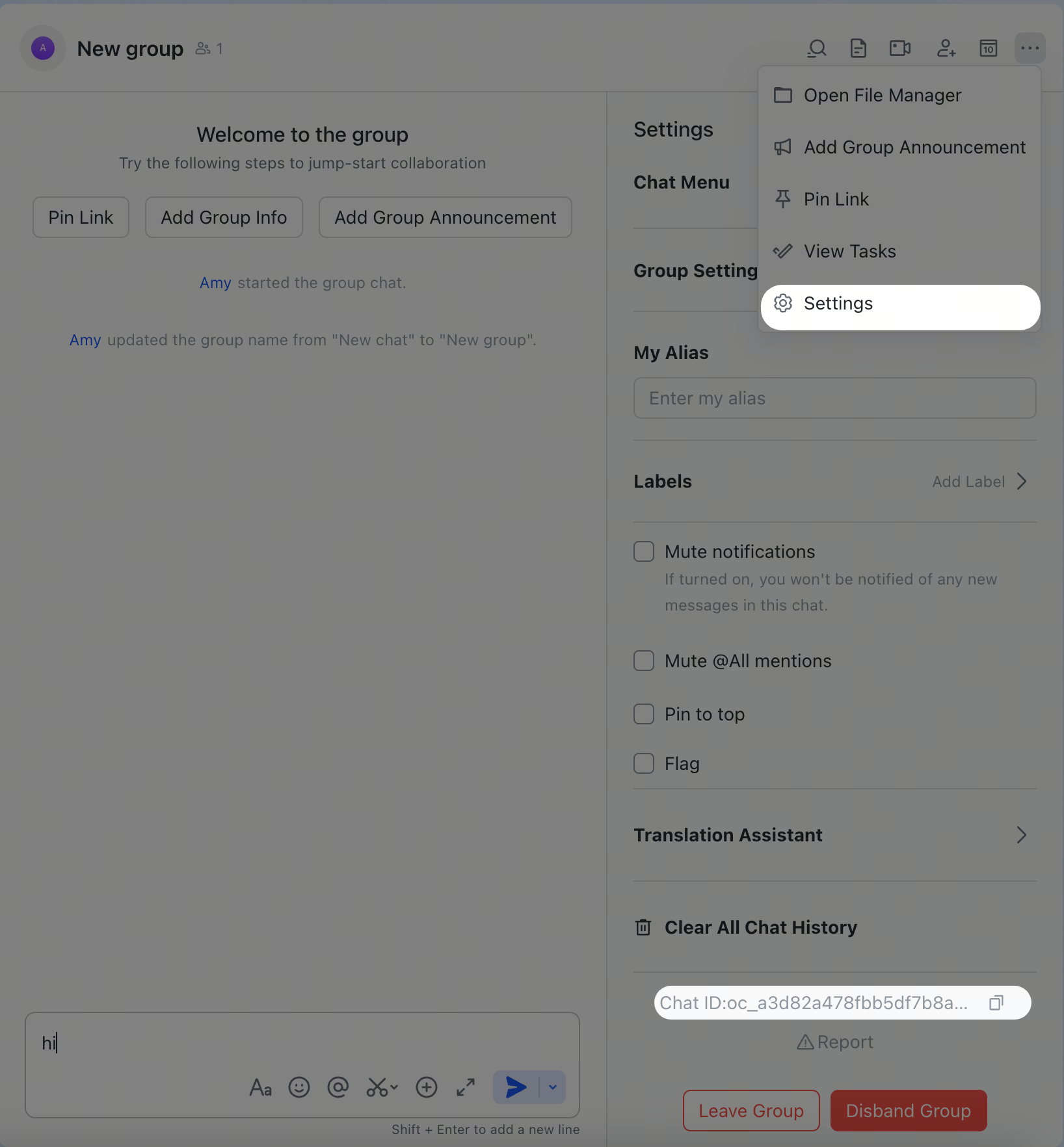
Group IDs (chat_id, format: oc_xxx)
Open the group in Feishu/Lark, click the menu icon in the top-right corner, and go to Settings. The group ID (chat_id) is listed on the settings page.
User IDs (open_id, format: ou_xxx)
Start the gateway, send a DM to the bot, then check the logs:
genesis logs --follow
Look for open_id in the log output. You can also check pending pairing requests:
genesis pairing list feishu
Common commands
| Command | Description |
|---|---|
/status |
Show bot status |
/reset |
Reset the current session |
/model |
Show or switch the AI model |
Feishu/Lark does not support native slash-command menus, so send these as plain text messages.
Troubleshooting
Bot does not respond in group chats
- Ensure the bot is added to the group
- Ensure you @mention the bot (required by default)
- Verify
groupPolicyis not"disabled" - Check logs:
genesis logs --follow
Bot does not receive messages
- Ensure the bot is published and approved in Feishu Open Platform / Lark Developer
- Ensure event subscription includes
im.message.receive_v1 - Ensure persistent connection (WebSocket) is selected
- Ensure all required permission scopes are granted
- Ensure the gateway is running:
genesis gateway status - Check logs:
genesis logs --follow
App Secret leaked
- Reset the App Secret in Feishu Open Platform / Lark Developer
- Update the value in your config
- Restart the gateway:
genesis gateway restart
Advanced configuration
Multiple accounts
{
  channels: {
    feishu: {
      defaultAccount: "main",
      accounts: {
        main: {
          appId: "cli_xxx",
          appSecret: "xxx",
          name: "Primary bot",
        },
        backup: {
          appId: "cli_yyy",
          appSecret: "yyy",
          name: "Backup bot",
          enabled: false,
        },
      },
    },
  },
}
defaultAccount controls which account is used when outbound APIs do not specify an accountId.
Message limits
textChunkLimit— outbound text chunk size (default:2000chars)mediaMaxMb— media upload/download limit (default:30MB)
Streaming
Feishu/Lark supports streaming replies via interactive cards. When enabled, the bot updates the card in real time as it generates text.
{
  channels: {
    feishu: {
      streaming: true, // enable streaming card output (default: true)
      blockStreaming: true, // enable block-level streaming (default: true)
    },
  },
}
Set streaming: false to send the complete reply in one message.
Quota optimization
Reduce the number of Feishu/Lark API calls with two optional flags:
typingIndicator(defaulttrue): setfalseto skip typing reaction callsresolveSenderNames(defaulttrue): setfalseto skip sender profile lookups
{
  channels: {
    feishu: {
      typingIndicator: false,
      resolveSenderNames: false,
    },
  },
}
ACP sessions
Feishu/Lark supports ACP for DMs and group thread messages. Feishu/Lark ACP is text-command driven — there are no native slash-command menus, so use /acp ... messages directly in the conversation.
Persistent ACP binding
{
  agents: {
    list: [
      {
        id: "codex",
        runtime: {
          type: "acp",
          acp: {
            agent: "codex",
            backend: "acpx",
            mode: "persistent",
            cwd: "/workspace/genesis",
          },
        },
      },
    ],
  },
  bindings: [
    {
      type: "acp",
      agentId: "codex",
      match: {
        channel: "feishu",
        accountId: "default",
        peer: { kind: "direct", id: "ou_1234567890" },
      },
    },
    {
      type: "acp",
      agentId: "codex",
      match: {
        channel: "feishu",
        accountId: "default",
        peer: { kind: "group", id: "oc_group_chat:topic:om_topic_root" },
      },
      acp: { label: "codex-feishu-topic" },
    },
  ],
}
Spawn ACP from chat
In a Feishu/Lark DM or thread:
/acp spawn codex --thread here
--thread here works for DMs and Feishu/Lark thread messages. Follow-up messages in the bound conversation route directly to that ACP session.
Multi-agent routing
Use bindings to route Feishu/Lark DMs or groups to different agents.
{
  agents: {
    list: [
      { id: "main" },
      { id: "agent-a", workspace: "/home/user/agent-a" },
      { id: "agent-b", workspace: "/home/user/agent-b" },
    ],
  },
  bindings: [
    {
      agentId: "agent-a",
      match: {
        channel: "feishu",
        peer: { kind: "direct", id: "ou_xxx" },
      },
    },
    {
      agentId: "agent-b",
      match: {
        channel: "feishu",
        peer: { kind: "group", id: "oc_zzz" },
      },
    },
  ],
}
Routing fields:
match.channel:"feishu"match.peer.kind:"direct"(DM) or"group"(group chat)match.peer.id: user Open ID (ou_xxx) or group ID (oc_xxx)
See Get group/user IDs for lookup tips.
Configuration reference
Full configuration: Gateway configuration
| Setting | Description | Default |
|---|---|---|
channels.feishu.enabled |
Enable/disable the channel | true |
channels.feishu.domain |
API domain (feishu or lark) |
feishu |
channels.feishu.connectionMode |
Event transport (websocket or webhook) |
websocket |
channels.feishu.defaultAccount |
Default account for outbound routing | default |
channels.feishu.verificationToken |
Required for webhook mode | — |
channels.feishu.encryptKey |
Required for webhook mode | — |
channels.feishu.webhookPath |
Webhook route path | /feishu/events |
channels.feishu.webhookHost |
Webhook bind host | 127.0.0.1 |
channels.feishu.webhookPort |
Webhook bind port | 3000 |
channels.feishu.accounts.<id>.appId |
App ID | — |
channels.feishu.accounts.<id>.appSecret |
App Secret | — |
channels.feishu.accounts.<id>.domain |
Per-account domain override | feishu |
channels.feishu.dmPolicy |
DM policy | allowlist |
channels.feishu.allowFrom |
DM allowlist (open_id list) | [BotOwnerId] |
channels.feishu.groupPolicy |
Group policy | allowlist |
channels.feishu.groupAllowFrom |
Group allowlist | — |
channels.feishu.requireMention |
Require @mention in groups | true |
channels.feishu.groups.<chat_id>.requireMention |
Per-group @mention override | inherited |
channels.feishu.groups.<chat_id>.enabled |
Enable/disable a specific group | true |
channels.feishu.textChunkLimit |
Message chunk size | 2000 |
channels.feishu.mediaMaxMb |
Media size limit | 30 |
channels.feishu.streaming |
Streaming card output | true |
channels.feishu.blockStreaming |
Block-level streaming | true |
channels.feishu.typingIndicator |
Send typing reactions | true |
channels.feishu.resolveSenderNames |
Resolve sender display names | true |
Supported message types
Receive
- ✅ Text
- ✅ Rich text (post)
- ✅ Images
- ✅ Files
- ✅ Audio
- ✅ Video/media
- ✅ Stickers
Send
- ✅ Text
- ✅ Images
- ✅ Files
- ✅ Audio
- ✅ Video/media
- ✅ Interactive cards (including streaming updates)
- ⚠️ Rich text (post-style formatting; doesn't support full Feishu/Lark authoring capabilities)
Threads and replies
- ✅ Inline replies
- ✅ Thread replies
- ✅ Media replies stay thread-aware when replying to a thread message
For groupSessionScope: "group_topic" and "group_topic_sender", native
Feishu/Lark topic groups use the event thread_id (omt_*) as the canonical
topic session key. Normal group replies that Genesis turns into threads keep
using the reply root message ID (om_*) so the first turn and follow-up turn
stay in the same session.
Related
- Channels Overview — all supported channels
- Pairing — DM authentication and pairing flow
- Groups — group chat behavior and mention gating
- Channel Routing — session routing for messages
- Security — access model and hardening